
The free part is the project
Universal Modder's source is distributed under the MIT license. You can read the repository and its knowledge base without buying a Universal Modder subscription. This independent guide does not sell access to it.
The rest of a modding session depends on what you use. A coding agent may require a subscription, credits or your own model access. Asset generation may have a separate bill. You also need lawful access to the game and enough storage for a working copy, builds and backups.
There is no honest single price for “a Universal Modder mod.” A small code change and a scene with generated images, 3D models and video use very different resources. Decide which outputs you need before enabling paid generation. Ask your agent to stop for approval before each paid asset stage.
Local software checklist
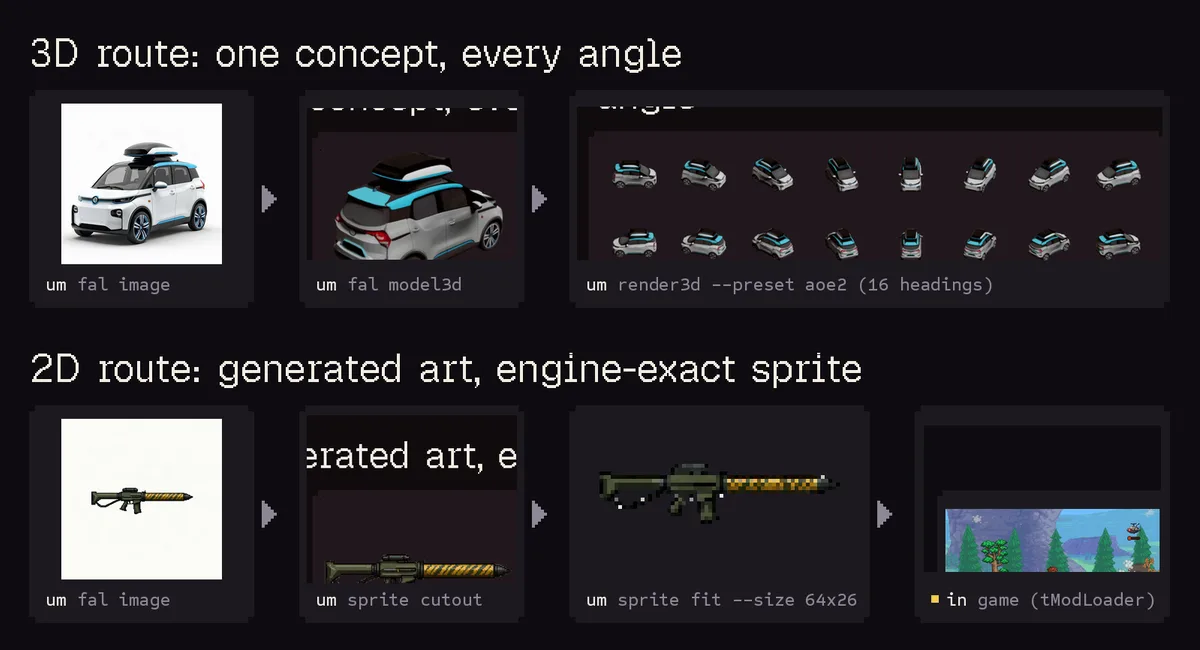
The project illustrates two asset routes: 3D models to directional sprites, and 2D art to a fitted game sprite. View source ↗
Source: Rehan and universal-modder contributors. Game rights belong to their respective owners. Media licenseThe official installation section lists these requirements:
| Component | What it is for | When to check it |
|---|---|---|
| Git | Retrieving the project and versioned code | Before installation |
| Python 3.10+ | Running the Python-based um CLI |
Before using the CLI |
| ffmpeg | Audio and video processing in the toolchain | Before the relevant media workflow |
| uv | Recommended Python tool installation route | If using the documented uv tool install command |
| Blender | Rendering 3D assets into sprite frames | Only for that 3D-to-sprite route |
| Coding agent | Reading the skills and carrying out tasks | Before starting a modding session |
| Game-specific tools | The chosen loader, compiler or asset tooling | After recon identifies the route |
An installed tool is useful only if the environment running your task can find it. For example, a program available in a native Windows terminal may not be available under WSL. Keep track of where the agent, Python and game are running.
The repository describes driving Windows games natively or from WSL. That statement does not mean every Windows example is portable to macOS or Linux. Check the example's own dependencies rather than inferring support from the fact that Python runs on your computer.
Coding-agent access
Universal Modder adds skills and tools to an agent you already run. The installation guide lists the supported integration routes. It does not include an agent account or guarantee a free model allowance.
Check the plan and usage terms of your chosen agent directly. Prices and included usage can change, so this guide does not freeze a subscription price that could become misleading. Before a long session, confirm whether your agent bills per request, token, credit or subscription allowance.
For a first test, keep the context and request narrow. Ask for recon, read the plan, and approve one small change. Repeatedly requesting a complete redesign makes both the cost and the cause of failures harder to track.
Asset generation: fal or local images
The official project integrates fal for image, audio, video and 3D workflows. You provide your own access. Check the selected model's current price and expected output before submitting a job; one provider can have several models with different billing units.
Keep your key in the local environment where the tool expects it. Do not include it in code, a shared prompt, a screenshot or a public issue. This website has no reason to receive your key.
For image generation without a fal key, the project documents um comfy, which connects to a local ComfyUI server. You still need the server, compatible models and hardware capable of running that workflow. Local generation avoids that particular hosted API charge, but it uses your storage, compute time and electricity.
Do not assume the local-image path covers all fal features. If your plan requires a particular 3D model, sound effect or video route, check that feature separately. A code-only first mod can postpone this entire decision.
Hardware and storage
The upstream README does not supply a universal minimum RAM or GPU specification for every modding workflow. Requirements come from the game, the agent's execution setup, the build tools and any local generation model.
Running a normal game plus a small build is different from running two games together. The Minecraft/GTA V example, for instance, involves both game processes and a compositing setup. A successful demonstration on someone else's machine does not establish that your system can reproduce it.
Plan disk space for the repository, dependencies, generated assets, build outputs and backups. Before downloading large models or duplicating a game install, check the individual tool's requirements and your available space. Do not invent a universal “8 GB” or “16 GB” answer where the workflow has not been chosen.
A low-cost first session
Start with the game and agent access you already have. Choose a documented modding route and a task that can use existing permitted assets or a small original placeholder. Confirm the game launches normally before adding anything.
Use the first-mod prompt to ask for inspection and a rollback plan before edits. Keep paid asset generation outside the first pass. When the small change works in game, you can estimate the next stage from actual requirements instead of a vague “make a full mod” request.
If a dependency or service is missing, decide whether the task needs it now. A missing Blender install should block a Blender rendering task; it should not send you into reinstalling an unrelated agent integration.
Questions about “free”
Can I read the knowledge base without paying?
Yes. The public knowledge index is available on GitHub. Reading it does not itself invoke a paid coding agent or generate an asset.
Can the whole workflow be free?
That depends on your existing game access, agent arrangement, hardware and chosen task. The project license alone cannot guarantee a zero-cost session. Identify those dependencies first.
Do I need fal to begin?
Not to read field notes, inspect the documented workflow, or plan a code-only change. Generated-asset tasks have their own requirements. Follow the route your actual task needs, then return to installation for the relevant setup.